
B2B E-commerce & Graphic Fulfillment Website 

BrandHub Solutions

Overview BrandHub Solutions at a Glance

BrandHub Solutions is The Howard Company's branded online ordering storefront for franchise and multi-location businesses. Instead of corporate teams juggling vendors, fielding order requests, and policing brand standards location by location, BrandHub puts everything in one private site: your locations order approved signage, menus, and branded materials directly, and your team keeps exactly as much oversight as it wants.

  • Your own branded site, showing only the products you approve

  • Oversight on your terms, approve every order, only certain products or spend levels, or none at all

  • Editable templates let users update prices and listings themselves, within limits you set

  • One partner behind it: The Howard Company manufactures and ships what your locations order, working from your existing artwork or designing it for you

  • User permissions, order history, and payment options configured around how your brand operates


Every site is built custom. Some brands run a simple product catalog where locations order and pay on the spot. Others route every template order through an approver and filter what each user can see. Most BrandHub builds launch in 8 to 14 weeks, and it starts with a demo meeting where you see a live site.

The problem this solves Built for the Team Managing All of It

If you manage a franchise network, you know where the time goes. Even a well organized team spends it on back and forth.

The back and forth today

  • Every order needs a proof, every proof needs a review, and someone has to keep it all on task.

  • Reorders mean digging up which size each location runs.

  • Tracking lives across emails, spreadsheets, and files that all have to stay current.

  • There's always a location asking for a one off that corporate has never seen.

One central hub with BrandHub

  • Locations order current, approved products in the sizes they actually run.

  • Order history makes reorders a two minute job instead of a document hunt.

  • See who ordered what across the network, and order on a location's behalf when needed.

  • Orders route through whatever review you want, and your whole network buys from one storefront.

  • Because The Howard Company manufactures what your locations order, and can fold in items we source for you, your network buys from one storefront instead of a vendor list.

Whats on the site

What Can Locations Order Through BrandHub?

Anything The Howard Company provides for your brand, plus the printed materials locations reorder all year. The list below is a sample of what brands put on their sites, not the limit.

Icon of a drive-thru canopy representing outdoor products

Outdoor Products

Offered in packages or individually, including but not limited to menu board systems, canopies, clearance bars, directional signs, exterior signs, and more.
Icon of interior shelving representing indoor products

Indoor Products

Offered as sets or individual products for indoor items like digital displays, cash register shrouds, wallpaper, mobile pickup shelves, counter letters, and more.

Icon of a digital screen representing printed and digital content

Printed & digital content

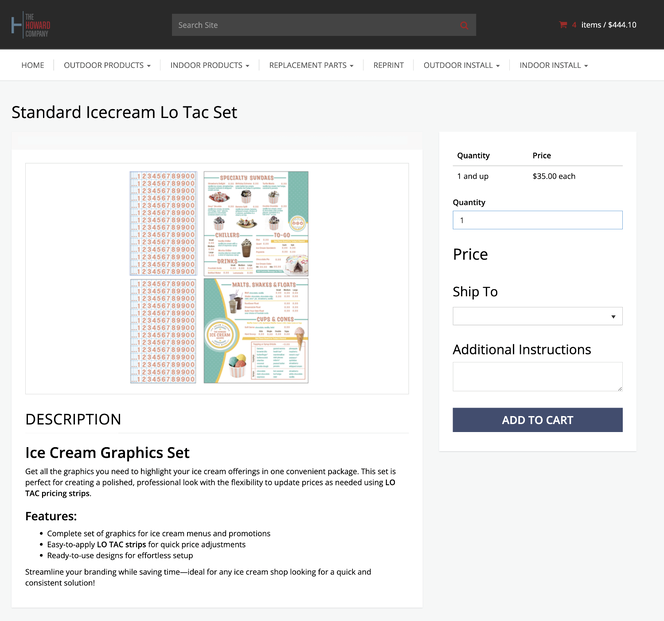
Offered as templates, upload files, or standard sets you simply add to cart. Includes graphic sets, replacement graphics, digital content, hours-of-operation signs, promotional and poster signage, directional graphics, and more.

Icon of a checklist document representing replacement parts

Replacement parts

You can also order individual equipment pieces as needed, like wing brackets, drive-thru doors, acrylic covers, booster wings, toppers, merchandisers, and more.

BrandHub product page for the Standard Icecream Lo Tac Set showing pricing and add-to-cart options

How Much Oversight Do You Want?

BrandHub supports four ordering models, from corporate approving everything to locations ordering freely. You don't need to pick before we talk, in your discovery meeting we ask how ordering works today, who needs visibility, and where approvals happen, then recommend the fit.

Corporate approval

Most oversight

Locations place orders, and your designated approver reviews them before they reach us. The trigger is up to you, a product, a dollar threshold, a category, or a combination.

Self signup with approval

High oversight

The site stays open, but each new account needs a yes from your team. Once approved, users order freely, you control who gets in without reviewing every order.

Fully managed

Role based

We create users for you, filter which products each user group sees (for example, by drive thru type), and set approval rules on specific products or spend levels. Built for brands where ordering rules vary by role.

Open ordering

Least oversight

Users create their own accounts and order without approvals, the simplest model, for brands where speed matters more than control.


The range The Same Platform, Three Very Different Sites

Every BrandHub site is configured around one brand's rules. Here is the real range, from simplest to most controlled.

See BrandHub Built Around Your Brand

The fastest way to understand BrandHub is to see a live site. In one demo meeting we walk through a working storefront, talk through your products and ordering process, and follow up with a written Scope of Work. No commitment until you sign.

1Level 1: Simplest

Arby's

A products only site. Franchisees sign up, order approved products, and pay on site. No templates, no approval steps, just fast reordering with brand control built into the catalog itself.

  • Editable templatesNone
  • Approval workflowNone
  • Product visibilityOpen catalog
  • PaymentPay on site
2Level 2

Rita's Italian Ice

Products plus editable templates. Locations update pricing, choose which approved images appear, and swap listings on their materials, then pay on site. Corporate control lives in the templates, so no approval workflow is needed.

  • Editable templatesPricing, images, listings
  • Approval workflowNone
  • Product visibilityOpen catalog
  • PaymentPay on site
3Level 3: Most controlled

PJ's Coffee of New Orleans

Every template order is approved by their Franchise Business Consultant before it moves ahead. Each user only sees what is relevant to them, new users are added by request, and orders are quoted on site with our team following up to collect final payment.

  • Editable templatesPricing and listings
  • Approval workflowAll template orders
  • Product visibilityFiltered by user
  • PaymentQuoted, we follow up

Your site can sit anywhere on this range, and it can change as your brand grows.

Key Features of a BrandHub Site

Sliders icon representing brand control settings

Brand control built in

The site only displays approved, current products, so every location orders the right item every time. No outdated artwork, no off-brand one offs.

Person and gear icon representing custom site user setup

User groups & permissions

Decide what each user can see and do: order approval rights, reporting access, user management, and product visibility by role or location. Users can be added by self signup or by request, with a one time spreadsheet upload available at the initial build.

Smart Order Management

Locations & address book

A personal address book comes with every site. Predefined location lists let franchisees pick from approved store addresses instead of typing them.

Checkmark icon representing approval workflow

Approval workflows

Route orders for review by product, dollar threshold, or user group before they reach production. Approvers can edit orders or place them on a location’s behalf.

Grid layout icon with cursor representing an editable content template

Editable graphic templates

Users update prices, swap listings, or replace approved images on their templates before ordering. You choose how much editing to allow.
247 Access graphic

24/7 access

Locations order from any device, whenever it fits their schedule, and your rules apply around the clock.
Editable templates Can Users Customize Menus and Graphics Themselves?

Yes, exactly as much as you allow. We build master templates for the materials that change per location, such as menus, posters, table tents, and promotional pieces, and users edit only the parts you open up. Print specifications stay locked by our team, so everything that ships still meets brand standards.

Templates do need a starting point: a standard design your locations share. Variations are fine to an extent, and we define those rules with you up front. For materials that vary too much for a template, we set up upload fields instead: the user uploads their file, our team tweaks it, and we send a proof for approval before anything moves ahead.

Four complexity levels. You don't have to pick one, we recommend the level that fits once we understand what your users need to change. Each level below notes how one brand's pastry menu, which varies by location, behaves.

What users can edit 1SimpleOne element only, typically a price 2ModeratePrices, approved images, listings 3AdvancedAdds built in logic 4FullWidest editing range
Each level includes everything to its left, plus more The starting point Everything in Simple, plus Everything in Moderate, plus Everything in Advanced, plus
Edit prices and text fields
Swap listings in and out
Choose images from a preset library you approve
Built in logic, for example calorie counts that realign automatically as items change
Color choices from preset palettes
Multiple layout variants
Design and print specs stay locked by The Howard Company
The pastry menu example Update seasonal prices in a text box Pick pastries from a dropdown and swap in approved photos Calorie counts realign automatically as items change Adjust background colors and layout seasonally
1

Simple

The starting point
  • Edit prices and text fields (one element only, typically a price)
  • Design and print specs stay locked by The Howard Company

Pastry menu: update seasonal prices in a text box.

2

Moderate

Everything in Simple, plus
  • Swap listings in and out
  • Choose images from a preset library you approve

Pastry menu: pick pastries from a dropdown and swap in approved photos.

3

Advanced

Everything in Moderate, plus
  • Built in logic, for example calorie counts that realign automatically as items change

Pastry menu: calorie counts realign automatically as items change.

4

Full

Everything in Advanced, plus
  • Color choices from preset palettes
  • Multiple layout variants

Pastry menu: adjust background colors and layout seasonally.

How it works How a BrandHub Site Gets Built

Site setup takes 2 to 4 business days. The product build runs about 3 weeks on average once your content is in, and editable template work (4 to 6 weeks when in scope) runs alongside it. Most BrandHub builds take 8 to 14 weeks from kickoff to launch, depending on complexity and how quickly your team provides inputs. The build is milestone based, each phase has clear inputs from your team and outputs from ours, and your Scope of Work includes a target go live specific to your build.

Discovery meeting

About an hour with your sales rep and our BrandHub project team. You see a live demo of a full site, and we walk through your products, users, approvals, and any editable materials. You do not need every answer ready; the meeting exists to surface them.

Scope of Work

Within 2 to 3 business days you receive a written Scope of Work: what we discussed, what the site includes, timing, and what we need from you. Build kicks off within 3 business days of your signed copy.

Build

We set up your branded site, then build your products, pricing, and any editable templates as your content comes in. You sign off at each milestone, including a site review with test orders.

Launch & rollout

Quality checks and your final review take 1 to 2 weeks. Every launch includes training, written instructions, and a how to order video. Most brands start with a pilot location, then open the site to everyone. We check in about two weeks after launch.


The Howard Company episode about e-commerce and graphic fullfilment platform

Hear is From the Team That Builds These Sites

Our E-commerce project specialist and production manager sat down to talk through how BrandHub works day to day: what changes for a brand when ordering moves onto one platform, and what happens behind the scenes when a location updates a menu price at 9 pm.

Working together What Your Team Provides

A BrandHub build works best when both sides know their part. We handle the site build, product creation, templates, pricing setup, shipping data, and quality checks. Your team handles four things.

The Howard Company handles

  • Site build

  • Product creation

  • Templates

  • Pricing setup

  • Shipping data

  • Quality checks

Your team provides

  • Confirm the product list. We prepopulate it from your order history, and you tell us what belongs on the site.

  • Share artwork where it applies. Native design files work best; if a flattened PDF is all you have for an item, tell us and we plan around it. Logos and brand colors are helpful but optional.

  • Provide user and location info on our standard template, if your build uses them.

  • Keep decision makers available. Quick approvals at milestones are the single biggest factor in hitting your target go live.

Frequently Asked Questions

What is BrandHub Solutions?

BrandHub Solutions is The Howard Company's branded online ordering storefront program for franchise and multi location businesses. Each brand gets a dedicated, custom branded site where its locations order approved signage, menus, drive-thru equipment, and branded materials directly from The Howard Company, with user permissions, approval workflows, and editable templates configured around how the brand operates.

What is a branded ordering site?

A branded ordering site, often called a brand portal, is a private ecommerce site, built around one brand, where its locations and franchisees order approved products and graphics from a single vendor. Instead of each location buying signage and print from whoever is closest, the site shows only current, approved items, routes orders through any required approvals, and keeps ordering history in one place. BrandHub Solutions is The Howard Company's branded ordering site program.

How much oversight does corporate keep?

As much as you want. Some brands approve every order before it reaches us, some only review orders over a dollar threshold or on specific products, and some let locations order freely from the approved catalog. Product visibility, user permissions, and approval rules are all configured per site, and the approved catalog itself protects the brand even with no approvals at all.

How much does a BrandHub site cost?

Pricing structure depends on your build and your partnership with The Howard Company. Your sales representative scopes it with you in a discovery meeting, and everything is confirmed in a written Scope of Work before any work begins, so there are no surprises mid build.

How long does it take to launch a BrandHub site?

Most BrandHub builds take 8 to 14 weeks from kickoff to launch, depending on complexity and how quickly your team provides inputs. Sites with customizable templates take longer, and simpler sites are faster. The build is milestone based, and your Scope of Work includes a target go live date specific to your build. 

Can users customize menus and graphics themselves?

Yes, within the limits you set. We build master templates for materials that change per location, starting from a standard design your locations share, and users edit only the elements you allow, from a single price field up to approved image swaps, color choices, and multiple layout variants. Designs and print specifications stay locked by The Howard Company, and materials that vary too much for a template can use upload fields instead, where our team reviews the file and sends a proof before anything moves ahead.

How do order approvals work?

You decide which orders need review before they reach us: specific products, orders above a dollar threshold, certain categories, or everything. Approvers on your team review those orders inside the site, can edit them if needed, and can place orders on behalf of locations that need assistance. Brands that want no approvals can run fully open ordering instead.

How do our people get accounts on the site?

Self signup, which we recommend for most brands, lets users create their own accounts, with or without an approval step, and manage their own passwords and profiles going forward. During the initial build, we can also provide a spreadsheet your team fills out for a one time mass upload of users. For brands with three or more user groups, we can manage the user list for you on an ongoing basis, scoped per project.

What do we need to provide?

Four things: confirmation of the product list we prepopulate from your order history, artwork where it applies (native design files preferred over flattened PDFs; logos and brand colors are optional), user and location information on our standard template if your build uses them, and decision makers who stay available for milestone approvals.

How does payment work?

Two options, and many sites use both by user role: quoted orders, where the order comes to our team and we follow up for final payment (the default for most franchise networks with central billing), or credit card checkout on the site. We configure the combination that fits how your brand purchases.

What happens after launch?

Printed graphic orders produce and ship in 5 to 10 business days after approval, rush within 3 days for an extra fee. Every launch includes training for your team, written instructions, and a how to order video. Most brands roll out with a pilot location for a week or two before opening the site to all locations, and we check in about two weeks after launch to handle adjustments. After that, locations order on their own schedule, and our team handles site level changes like product updates and new templates as your brand evolves.

What platform is BrandHub built on?

BrandHub sites run on Pressero, a commercial ecommerce storefront platform, with eDocuBuilder powering the editable templates, both by Aleyant. The Howard Company builds, configures, and manages your site end to end, so your team never touches the underlying platform.